CUDA Programming Model
This episode introduces the fundamental CUDA programming model: how GPUs execute work using thousands of threads, how to write and launch kernels, and how the thread hierarchy (grids, blocks, threads) maps to hardware.
Objectives
Understand the SIMT (Single Instruction Multiple Thread) execution model
Know the key terminology: host, device, kernel, grid, thread block, warp
Write and launch a simple CUDA kernel in C/C++ and Fortran
Understand the execution configuration (grid and block dimensions)
Use built-in variables to distribute work across threads
Instructor note
60 min teaching
30 min exercises
Terminology
Before diving into code, let us establish the key terms:
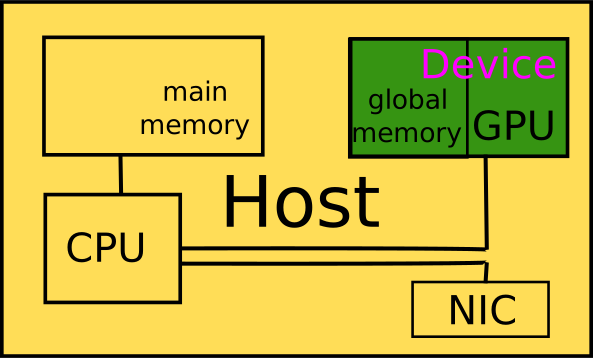
Host — The entire system the GPU is built into, including CPU, main memory, network interface card, etc.
Device — The GPU, including device memory. Often used interchangeably with “GPU”.
System/main memory — Main memory of the host (CPU RAM).
Device/global memory — Main memory of the device (GPU VRAM).
Host code — Code that executes on the host (CPU).
Device code — Code that executes on the device (GPU).
(Streaming) multiprocessor (SM) — A subdivision of the GPU, comparable to a CPU core. Sometimes referred to as a “GPU core”.
A first CUDA program
A CUDA program is usually organised as follows:
A regular host program that controls overall program flow, manages GPU memory allocations, transfers data between host and device, and launches kernels on the GPU.
Device code containing functions (called kernels) that are suitable for execution on the GPU.
This is the accelerator programming model: the host orchestrates the overall program flow, and the device executes the compute-heavy work that the host tells it to do. Host and device can work independently on their work queues, so synchronisation is necessary.
Here is a complete CUDA program in C and Fortran side by side:
 1#include <stdio.h>
 2#include <stdlib.h>
 3#include <cuda_runtime.h>
 4
 5#define BLOCKSIZE 256
 6#define D 100
 7
 8__global__ void init(double* X, double* Y) {
 9    int i = blockIdx.x * blockDim.x + threadIdx.x;
10    if (i < D) {
11        X[i] = i;
12        Y[i] = 2 * i;
13    }
14}
15
16int main(void) {
17    dim3 gridDimensions(BLOCKSIZE);
18    dim3 blockDimensions((BLOCKSIZE - 1 + D) / BLOCKSIZE);
19
20    double *X_d, *Y_d;
21    cudaMallocManaged((void**)&X_d, D * sizeof(double));
22    cudaMallocManaged((void**)&Y_d, D * sizeof(double));
23
24    init<<<gridDimensions, blockDimensions>>>(X_d, Y_d);
25    cudaDeviceSynchronize();
26    cudaFree(X_d);
27    cudaFree(Y_d);
28}
 1attributes(global) subroutine init(x, y)
 2  double precision, device :: x(:), y(:)
 3  integer :: i
 4  i = threadIdx%x + (blockIdx%x - 1) * blockDim%x
 5  if (i <= size(x)) then
 6    x(i) = i - 1
 7    y(i) = 2 * (i - 1)
 8  end if
 9end subroutine init
10
11program main
12  USE cudafor
13  IMPLICIT NONE
14  INTEGER :: D = 100, blocksize = 256, istat
15  DOUBLE PRECISION, managed, ALLOCATABLE, DIMENSION(:) :: X_d, Y_d
16
17  type(dim3) :: gridDimensions, blockDimensions
18  gridDimensions = dim3((blocksize - 1 + D) / blocksize, 1, 1)
19  blockDimensions = dim3(blocksize, 1, 1)
20
21  ALLOCATE(X_d(D), Y_d(D))
22  call init<<<gridDimensions, blockDimensions>>>(X_d, Y_d)
23  istat = cudaDeviceSynchronize()
24  deallocate(X_d, Y_d)
25end program main
How to create device code — kernels
To create code that runs on the GPU:
Include the CUDA runtime API with
#include <cuda_runtime.h>(C) or load the moduleUSE cudafor(Fortran). If you usenvcc, the header is included automatically for all.cufiles.Mark functions for GPU execution with
__global__(C) orattributes(global)(Fortran). Such a function is called a kernel.Variables declared in a kernel are private to each executing thread and stored in registers.
Kernels cannot have return values.
In Fortran, kernels must be defined inside modules.
#include <cuda_runtime.h>

#define D 100

__global__ void init(double* X, double* Y) {
    int i = blockIdx.x * blockDim.x + threadIdx.x;
    if (i < D) {
        X[i] = i;
        Y[i] = 2 * i;
    }
}
module kernel_mod
  attributes(global) subroutine init(x, y)
    double precision, device :: x(:), y(:)
    integer :: i
    i = threadIdx%x + (blockIdx%x - 1) * blockDim%x
    if (i <= size(x)) then
      x(i) = i - 1
      y(i) = 2 * (i - 1)
    end if
  end subroutine init
end module kernel_mod
How to call device code — kernel launch
Kernels are launched from host code using the triple chevron syntax:
init<<<gridDimensions, blockDimensions>>>(X_d, Y_d);
call init<<<gridDimensions, blockDimensions>>>(X_d, Y_d)
The pair (gridDimensions, blockDimensions) is called the execution configuration.
Important
Kernels are executed asynchronously with respect to the host. The host continues executing after launching a kernel without waiting for it to finish. Explicit synchronisation (e.g., cudaDeviceSynchronize()) may be necessary.
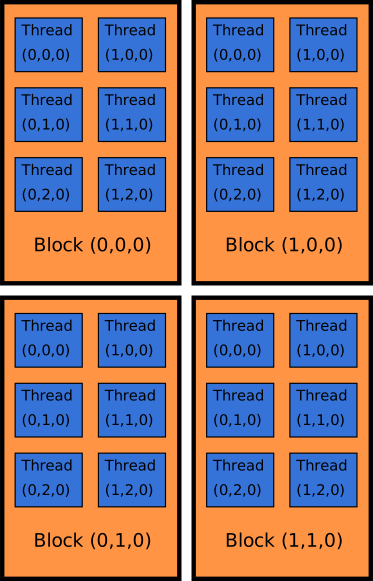
Execution configuration — grids and thread blocks
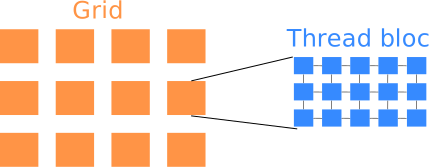
The execution configuration arguments gridDimensions and blockDimensions are either unsigned integers or of type dim3. An integer num_threads is automatically converted to dim3(num_threads, 1, 1) in C. In Fortran, you must set every unused entry to 1, e.g., type(dim3) :: blockDimensions = dim3(32, 1, 16).
The total number of threads launched is:
$$ \text{#threads} = \underbrace{(\texttt{blockDim.x} \cdot \texttt{blockDim.y} \cdot \texttt{blockDim.z})}{\text{threads per block}} \times \underbrace{(\texttt{gridDim.x} \cdot \texttt{gridDim.y} \cdot \texttt{gridDim.z})}{\text{blocks in the grid}} $$
This execution model is called Single Instruction Multiple Thread (SIMT) — a single kernel launch starts many threads. NVIDIA GPUs can launch thousands of threads in parallel (they are massively parallel).

Why grids of thread blocks?
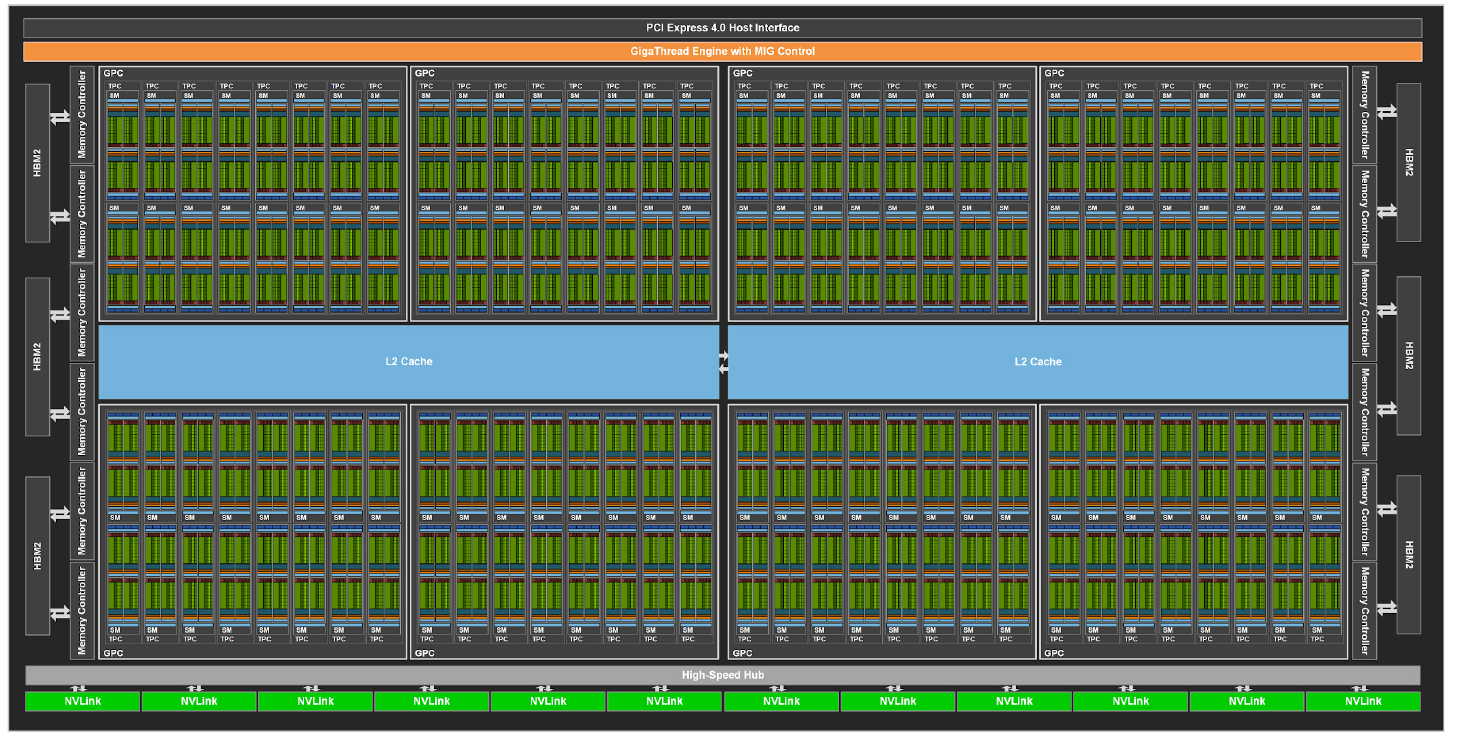
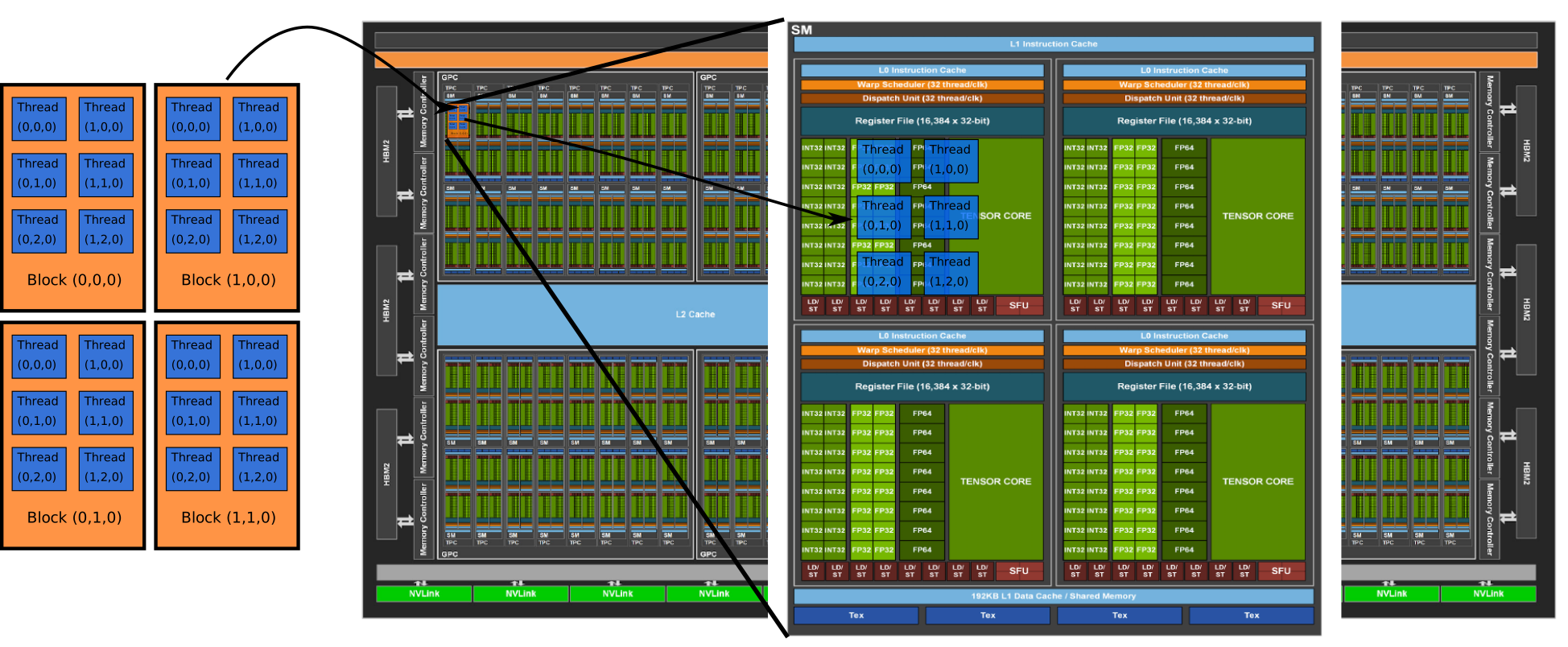
The GPU hardware is organised into streaming multiprocessors (SMs). Each SM can execute one or more thread blocks simultaneously. The grid/block structure maps naturally to this hardware:
Thread blocks are assigned to SMs.
Within an SM, threads are grouped into warps of 32 threads that execute in lock-step.
SIMT — how does it work?
Variables declared in a kernel are private to each thread and stored in registers by default. All threads execute (almost) the same instructions but on different data.
Each thread can determine which portion of data to work on using the built-in variables:
C/C++ |
Fortran |
Description |
|---|---|---|
|
|
Thread index within the block |
|
|
Block index within the grid |
|
|
Number of threads per block |
|
|
Number of blocks in the grid |
(Similarly for .y and .z dimensions.)
Counting starts from 0 in C/C++ and 1 in Fortran.
A typical use case is to split a large loop (where each iteration is independent) into chunks distributed over all threads. In many cases, a chunk size of 1 per thread works well.
Key rules for thread blocks:
Threads within a block can communicate with each other (via shared memory), but not with threads from different blocks.
The three dimensions (x, y, z) are mostly for convenience, not necessarily for performance. For example,
dim3(8,2,2),dim3(16,1,2), anddim3(4,4,2)all have 32 threads.The number of threads per block should be a multiple of 32 (the warp size). Otherwise, performance will typically drop significantly.
The order of execution of blocks is not guaranteed. Blocks can be scheduled in any order and may be executed in parallel or sequentially.
Differences between Fortran and C/C++
CUDA Fortran is based on CUDA for C/C++. Most functions that exist for C/C++ also exist for Fortran. Key differences:
In Fortran, there is sometimes the option to use native Fortran arguments (e.g., arrays) or
TYPE(C_PTR)/TYPE(C_DEVPTR)pointers.When native Fortran arguments are used, counts are in elements. When
TYPE(C_PTR)/TYPE(C_DEVPTR)is used, counts are typically in bytes.Counting starts at 0 in C/C++ and 1 in Fortran. Always pay attention, especially for library calls (cuBLAS, cuSPARSE, etc.).
Exercise: Kernel launch
Kernel Launch (C/C++)
The following program counts the number of threads that execute and records information from specific threads. Complete the TODO items:
Add the kernel specifier (
__global__) to the function.Define a kernel launch configuration (grid and block dimensions).
Complete the
ifconditions: the thread with the lowest sum of all indices should execute the first block, and the thread with the highest sum should execute the second block.
Hint: remember that block and grid dimensions can be read from blockDim.x, gridDim.x, etc.
#include <cstdio>
#include "cuda_runtime.h"
__managed__ int counter{0};
__managed__ dim3 blockDims_;
__managed__ dim3 gridDims_;
__managed__ int lowest_index_sum{-1};
__managed__ int highest_index_sum{-1};

// TODO: Add the kernel specifier for execution on GPU
void count_threads(int* counter) {
    atomicAdd(counter, 1);
    // TODO: only the thread with lowest sum of indices
    if (______) {
        blockDims_ = blockDim;
        gridDims_ = gridDim;
        lowest_index_sum = threadIdx.x + threadIdx.y + threadIdx.z
                         + blockIdx.x + blockIdx.y + blockIdx.z;
    }
    // TODO: only the thread with highest sum of indices
    if (_____) {
        highest_index_sum = threadIdx.x + threadIdx.y + threadIdx.z
                          + blockIdx.x + blockIdx.y + blockIdx.z;
    }
}

int main() {
    // TODO: specify a kernel launch configuration
    count_threads<<<________>>>(&counter);
    cudaDeviceSynchronize();
    printf("Program started %d threads.\n", counter);
}
Compile with nvcc -o exe exercise_kernel-launch.cu and run with ./exe. Test different grid and block layouts and check that the results match your expectations.
Note: There are limits on the number of threads per block (max 1024 total) and number of blocks (much larger). If you exceed them, the kernel will not execute.
Solution
__global__ void count_threads(int* counter) {
    atomicAdd(counter, 1);

    // Lowest sum: all indices are 0
    if (threadIdx.x + threadIdx.y + threadIdx.z
        + blockIdx.x + blockIdx.y + blockIdx.z == 0) {
        blockDims_ = blockDim;
        gridDims_ = gridDim;
        lowest_index_sum = 0;
    }
    // Highest sum: all indices at their maximum
    if (threadIdx.x == blockDim.x - 1 && threadIdx.y == blockDim.y - 1
        && threadIdx.z == blockDim.z - 1
        && blockIdx.x == gridDim.x - 1 && blockIdx.y == gridDim.y - 1
        && blockIdx.z == gridDim.z - 1) {
        highest_index_sum = threadIdx.x + threadIdx.y + threadIdx.z
                          + blockIdx.x + blockIdx.y + blockIdx.z;
    }
}

int main() {
    count_threads<<<dim3(2, 2, 1), dim3(32, 4, 1)>>>(&counter);
    cudaDeviceSynchronize();
    // ...
}
Keypoints
A CUDA program consists of host code (CPU) and device code (GPU kernels)
Kernels are launched with the triple chevron syntax
<<<gridDim, blockDim>>>The SIMT model executes the same kernel across many threads, each identified by built-in index variables
Thread blocks are assigned to streaming multiprocessors; threads within a block can communicate
The number of threads per block should be a multiple of 32 (the warp size)
The grid-stride loop is the recommended pattern for distributing work across threads